How exciting that you’re going to play Escape the City! Of course, we want to make sure it’s a huge success. On this page, you’ll find all the instructions and extra tips to make your city game an unforgettable outing. Still have questions? Don’t hesitate to call or email us!

Preparation

Instructions
Instructions for you as the main booker to help you prepare properly.

Game Manual
The manual for Escape the City players to understand how the game works.

Install the app
Install the app on one phone per team. Make sure to grant all permissions.

Game code
You will receive a game code from us, which you can enter into the app.
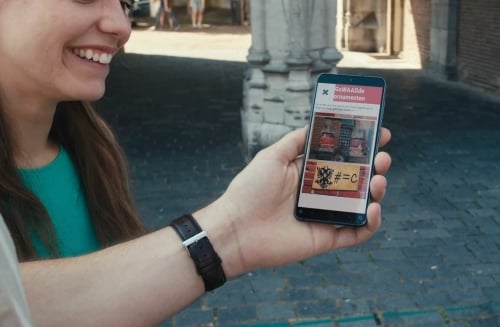
1. Instructions for playing the city game
In the instructions document linked below, you’ll find a clear step-by-step guide on how to play Escape the City. As the main booker, you can download this in advance. It’s not complicated, but we highly recommend taking the time to go through it thoroughly.
2. Game Manual Escape the City
The game guide provides an introduction to the game: what the goal is, the rules and how the game works! Be sure to read this guide carefully! It also includes useful tips. You can print this guide or send it digitally to the players (one per team is enough), so they can have it on hand during the game.

3. Download the app
3. Download the app
The app you need to play the game is called Quest Vault. You can find it in the App Store or Google Play. Note! Only one person per team should download the app. The other team members can follow along on their own phones (see info below), and they won’t need the app for this.
When opening the app, it will request access to things like your location. Make sure to grant all permissions while using the app. Otherwise, the app might malfunction!

4. Receiving the Game Code
4. Receiving the Game Code
You will receive your game code from us via email. You should only enter this game code into the app when your team or teams are ready at the agreed starting location, which is mentioned in the email with the game code.
Important! Before entering the game code, make sure to do the following:
- Turn WiFi OFF (completely off, just disconnecting is not enough)
- Turn 4G/5G (mobile internet) ON
- Turn GPS / Location ON
The game code is valid for the number of teams you have ordered. One person per team enters the game code! The other team members do not need to download the app. That person will enter a team name and email address (you will receive the results and photos at this email address after the game). Once all teams are logged in, you’re ready to start Escape the City.
Playing the Game – Tips & Tricks
Playing the Game – Tips & Tricks

Start Escape the City
Once you’ve logged in, you can start playing. Click on start, and the timer will immediately begin! Your team has 90 minutes to crack as many virtual rooms as possible.
TIP: Escape the City has lots of puzzles, varying in difficulty. The chances of solving all 9 rooms within the time limit are very small, almost impossible, in fact. The game is designed for you to solve as many puzzles and riddles as you can. If you don’t understand a puzzle, move on to another clue or puzzle. There are plenty! At the end of the game, it’s all about which team scores the most points. So, come up with a solid strategy!
Good luck & have fun!

Follow along on your own device
Want to follow along on your own device? No problem. Once the game has started, you’ll see a QR icon at the top of the app on your team’s main device. Click on it and scan the QR code with the phones that want to follow along. Note! The game is played on the main device, you’re just following along.
Tip: Make sure to stay close to the main device, or the connection for following along may be lost.

Need help?
Having trouble during the game? Is the app not working, or is something else wrong? Contact our helpdesk via the QR code next to this text or through the link below.

Extend playtime
The standard playtime is 90 minutes. Want to play longer? We can arrange this for you in advance or even during the game!
- Before playing: Want more playtime? Email us before you start, and we’ll set a longer playtime for you in advance.
- During the game: Want to extend your playtime while playing? Call us at +3185 065 4537 15 minutes before the playtime is up, and we’ll take care of it right away!
After the game

Receive results & photo's
After the game, you will immediately receive an email with the results and a link to the online photo album. This will be sent to the email address you used to place the order and the one you entered in the app.
Tip: Didn’t receive the email? Check your junk/spam folder. We send the results directly from the game system, so sometimes it’s marked as spam. If none of the players received the results, give us a call and we’ll manually send you the results and the link to the photo album :)

Award Ceremony & Cheers
It’s time for the award ceremony and what better way to do this than with some snacks and drinks? Enjoy chatting with everyone afterward, and don’t forget to let us know how you liked the event.
Tip: Playing in multiple teams? You could buy a fun award or gift to spice up the award ceremony.
We hope you will enjoy Escape the City!